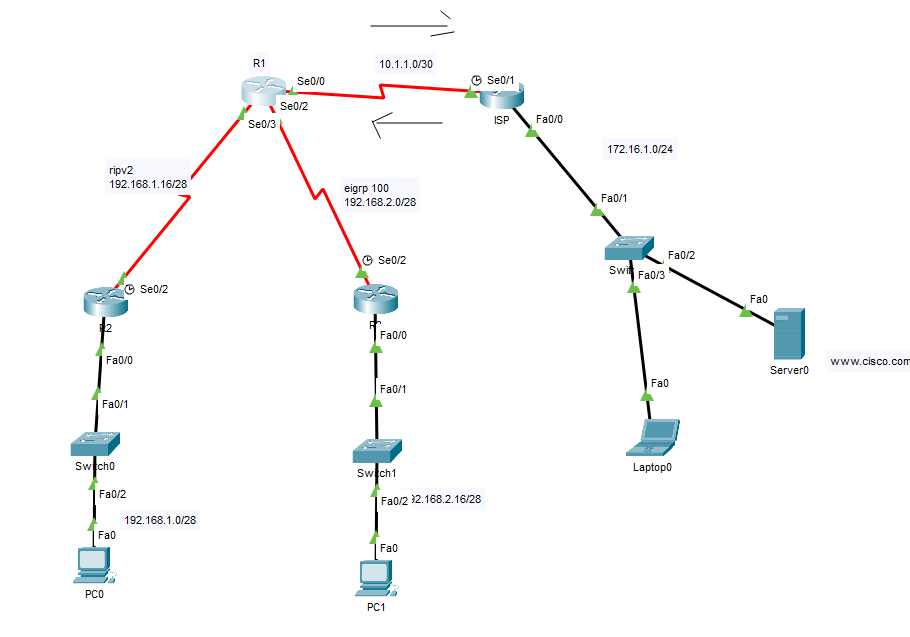
R2
int f0/0
ip add 192.168.1.1 255.255.255.240
no sh
exit
int s0/2
clock rate 128000
ip add 192.168.1.17 255.255.255.240
no sh
ex
router rip
ver 2
no auto-summary
network 192.168.1.0
R3
int f0/0
ip add 192.168.2.17 255.255.255.240
no sh
int s0/2
clock rate 128000
ip add 192.168.2.1 255.255.255.240
ex
router eigrp 100
network 192.168.2.0 0.0.0.15
network 192.168.2.16 0.0.0.15
ISP
int f0/0
ip add 172.16.1.1 255.255.255.0
no sh
int s0/1
ip add 10.1.1.2 255.255.255.252
no sh
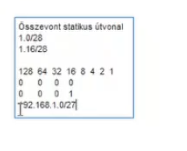
ip route 192.168.1.0 255.255.255.224 s0/1
ip route 192.168.2.0 255.255.255.224 s0/1
R1
int s0/0
clock rate 128000
ip add 10.1.1.1 255.255.255.252
no sh
ex
int s0/2
ip add 192.168.2.2 255.255.255.240
no sh
int s0/3
ip add 192.168.1.18 255.255.255.252
no sh
ex
router rip
ver 2
no auto-summary
default-information originate
network 192.168.1.16
ex
ip route 0.0.0.0 0.0.0.0 s0/0
router eigrp 100
no auto-summary
redistribute static
network 192.168.2.0 0.0.0.15
Kész eddig, ezen felüli opciók
ISP
router eigrp 100
redistribute rip metric 1544 10000 100 100 1500
router rip
redistribute eigrp 100 metric 3
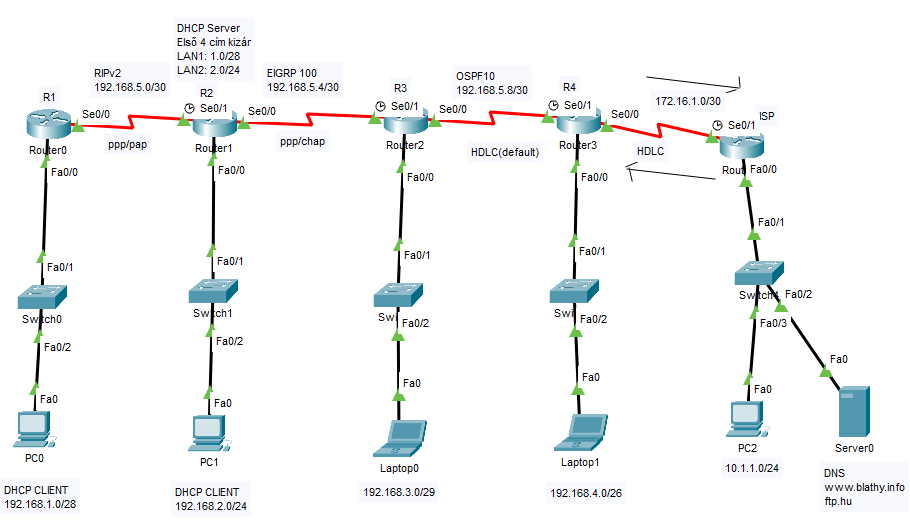
R1
int fa0/0
ip add 192.168.1.1 255.255.255.240
no sh
int s0/0
encapsulation ppp
clock rate 128000
ip add 192.168.5.1 255.255.255.252
no sh
router rip
ver 2
no auto-summary
network 192.168.1.0
network 192.168.5.0
int f0/0
ip helper-address 192.168.5.2
R2
in fa0/0
ip add 192.168.2.1 255.255.255.0
no sh
int s0/1
encapsulation ppp
ip add 192.168.5.2 255.255.255.252
no sh
int s0/0
clock rate 128000
encapsulation ppp
ip add 192.168.5.5 255.255.255.252
no sh
router rip
ver 2
no auto-summary
network 192.168.5.0
redistribute eigrp 100 metric 4
router eigrp 100
no auto-summary
network 192.168.2.0 0.0.0.255
network 192.168.5.4 0.0.0.3
redistribute rip metric 1544 1000 100 80 1500ip dhcp excluded-address 192.168.1.1 192.168.1.4
ip dhcp excluded-address 192.168.2.1 192.168.2.4
ip dhcp pool LAN2
network 192.168.2.0 255.255.255.0
default-router 192.168.2.1
dns-server 10.1.1.2
ip dhcp pool LAN1
network 192.168.1.0 255.255.255.240
default-router 192.168.1.1
dns-server 10.1.1.2
R3
int f0/0
ip add 192.168.3.1 255.255.255.248
no sh
int s0/1
clock rate 128000
encapsulation ppp
ip add 192.168.5.6 255.255.255.252
no sh
router eigrp 100
network 192.168.5.4 0.0.0.3
network 192.168.3.0 0.0.0.7
redistribute ospf 10 metric 1544 10000 100 100 1500
int s0/0
ip add 192.168.5.9 255.255.255.252
no sh
router ospf 10
network 192.168.3.0 0.0.0.7 area 0
network 192.168.5.8 0.0.0.3 area 0
redistribute eigrp 100 subnets
R4
int f0/0
ip add 192.168.4.1 255.255.255.192
no sh
int s0/1
ip add 192.168.5.10 255.255.255.252
no sh
int s0/0
clock rate 128000
ip add 172.16.1.1 255.255.255.252
no sh
ip route 0.0.0.0 0.0.0.0 s0/0
router ospf 10
default-information originate
network 192.168.4.0 0.0.0.63 area 0
network 192.168.5.8 0.0.0.3 area 0
ISP
int f0/0
ip add 10.1.1.1 255.255.255.0
no sh
int s0/1
ip add 172.16.1.2 255.255.255.252
no sh
ip route 192.168.1.0 255.255.255.240 serial 0/1
ip route 192.168.2.0 255.255.255.0 serial 0/1
ip route 192.168.3.0 255.255.255.248 serial 0/1
ip route 192.168.4.0 255.255.255.192 serial 0/1
ip route 192.168.5.0 255.255.255.252 serial 0/1
ip route 192.168.5.4 255.255.255.252 serial 0/1
ip route 192.168.5.8 255.255.255.252 serial 0/1
R1
username R2 password cisco
int s0/0
ppp authentication pap
ppp pap sent-username R1 password cisco
R2
username R1 password cisco
username R3 password cisco
int s0/1
ppp authentication pap
ppp pap sent-username R2 password cisco
int s0/0
ppp authentication chap
R3
int s0/0
ppp authentication chap
username R2 password cisco
Ha nem működik az autentikáció beállítása után, akkor mentsük el a futó konfigurációt és indítsuk újra az eszközöket!